
Uncategorized
YouTube Review: Is E-Ink still what it was created for?
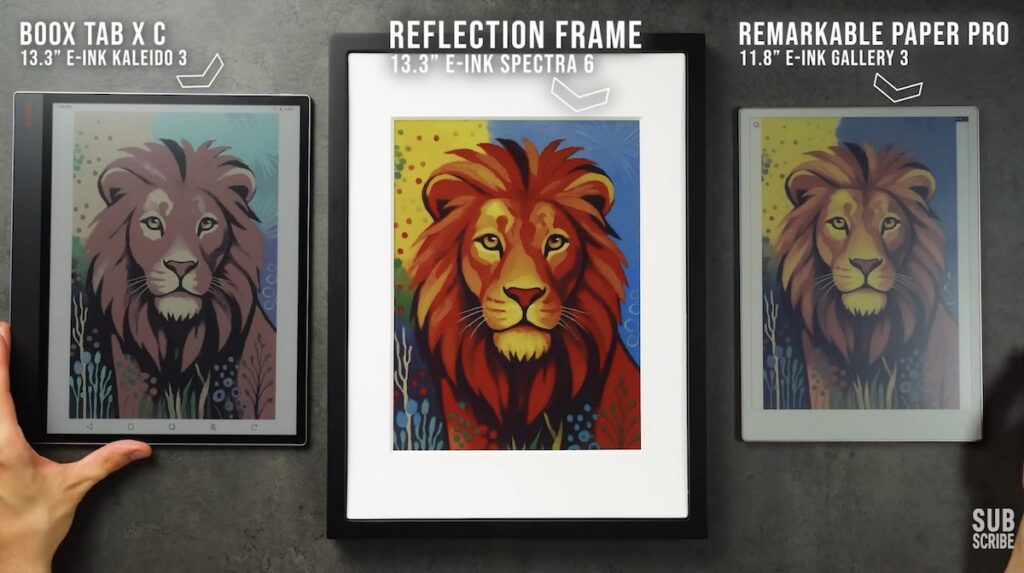
The original promise of E-Ink technology was very clear: a paper-like screen that is easy on the eyes, readable even in sunlight, and consumes very little power. In recent years, however, this focus has sometimes blurred – attempts have been made to turn E-Ink devices into fully functional tablets: Android, Google Play, stylus, etc.
This YouTube review highlights a simple idea – digital picture frames. And this is a very logical connection with E-Ink’s strengths – a static image, always visible, minimal power consumption, no need for fast refresh or interactivity.
In this context, we introduce the Reflection Frame – a 13.3-inch digital picture frame that uses E-Ink Spectra 6 color technology.
What makes Spectra 6 technology different?
-
Kaleido 3 = e.g., Kindle Colorsoft / Boox = monochrome E-Ink + RGB color filter on top
-
Spectra 6 = colored particles in the screen itself, without a filter
Spectra 6 can display 6 base tones: red, green, blue, yellow, white, black. Each pixel is one of these tones — there are no shades or soft transitions.
The trick used to create more colors is dithering (dot/mosaic blending). When viewed up close, it’s more noticeable, but when used in a picture frame (from 1–2 meters away), it blends together.
Major wow factor: color “pop” vs. other E-Ink (and even print)
The reviewer measured color intensity with a spectrophotometer, and according to them, the results were the best they had seen on E-Ink. Key takeaway: red/blue/yellow/black look very rich, and Spectra 6 is not as dark as Kaleido 3 filter solutions.
However, tones that require more blending (e.g., magenta, cyan) appear weaker. In other words, the closer to a base tone, the better the result.
Design and usage: minimalist, and for the right reason
The idea behind Reflection Frame is not to be a tablet. It is a picture frame:
-
can be used in portrait/landscape
-
available in black/white
Changing pictures: NFC + Bluetooth, which is genuinely convenient
The most practical part of the review is changing pictures:
-
download the phone app (iOS/Android)
-
select a picture or artwork
-
bring the phone to the bottom left corner of the frame
-
NFC initiates the connection, and the picture transfers via Bluetooth
Important detail: NFC must be present on the phone, otherwise this “touch-to-transfer” won’t work.
The screen refresh itself flashes in several stages (typical for E-Ink). Annoying as a tablet, but perfectly fine as a picture frame.
One UX point that could be better: the app stretches oddly sized pictures, and you have to manually adjust for a correct crop.
Conclusion: E-Ink technology applied to the right problem
The reviewer’s final assessment is clear:
-
Reflection Frame uses E-Ink as it was originally intended;
-
a single, clear output (displaying images), long battery life, no unnecessary distractions;
-
not for everyone due to the price, but the technology’s use case is absolutely correct.
If you like “quiet tech” and a paper-like aesthetic on your wall — this is a very convincing example that E-Ink doesn’t have to be a tablet killer to create value.
Also watch the YouTube clip
If you want to truly see how Spectra 6 colors look, how dithering behaves, and how easy it is to change pictures with NFC, then I definitely recommend watching this review. The video gives a 10× better feel than any spec sheet or product photo.